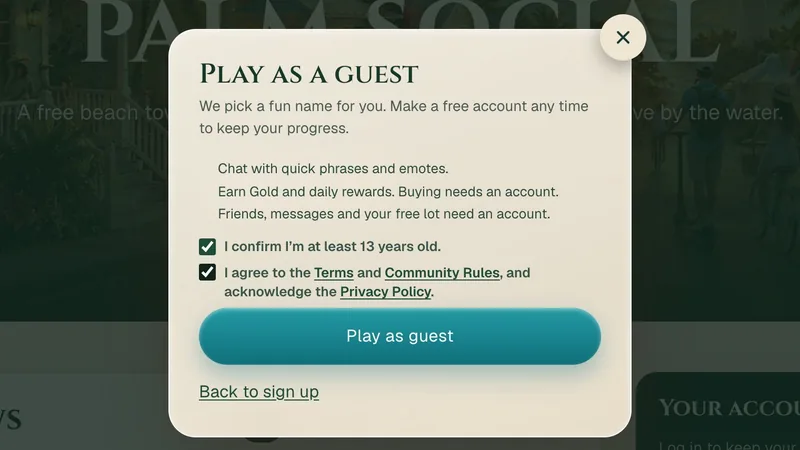
You can now play Palm Social without an account. Anyone 13 or older can jump in as a guest, with no email or password and nothing to download, and make a free account later to keep going.
How to play as a guest
On the home page, press Play now, then Continue as guest at the bottom of the sign-up window. Tick the two boxes (you are 13 or older, and you agree to the Terms and Community Rules) and press Play as guest.
We pick a fun name for you, like Sunny Pelican. In the character creator you can roll a New name up to five times a day. Pick your look and enter your age; if you are under 18, also tick the parent or guardian box. Press Enter Palm and you are on the beach.
What guests can do
- Chat with quick phrases and emotes. Open chat and pick a phrase, like Hello! or Want to grab a coffee?
- Earn Gold and daily rewards. Collect the daily reward, do the daily tasks and the starter tour, work café shifts and pick up beach shells.
- Look around. Explore the town and the beach, and visit other players' homes.
What needs a free account
- Buying. Guests can earn Gold but not spend it, and can't buy Gold.
- Friends, messages and gifts with other players.
- Your free lot and building a home.
- Typing your own messages in chat, and choosing your own name.
- Mining, the AI art and music tools, saving or sharing your own art and music, and voting or sending feedback on the community board.
Guest spots
Guests can use only part of each server. If all the guest spots are taken when you join, you will see Guest spots are full. Trying again… and the game keeps trying for you. Players with a free account don't use guest spots.
Your guest progress
- Your progress can only be reached from the browser you played in. If you clear your browser data or switch devices before you make an account, it is gone.
- Guest profiles that are not played for 60 days are deleted. The Terms have the details.
- You can delete your guest profile any time: open Settings & controls from the game menu and look under Account.
Keep your progress with a free account
When you are ready, make a free account in the same browser: press Guest · Keep your progress in the game, or Create a free account on the home page. Sign up with email, Google or Apple. Once your email is confirmed, choose Keep my guest progress, and your character, Gold and everything you earned move to your new account. You can also choose Start a new character instead.
Already have an account? Logging in loads that account's character; guest progress can't be merged into it.